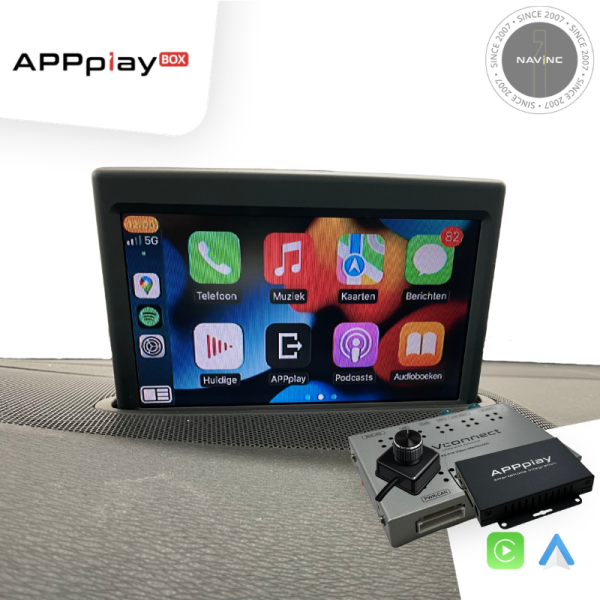
Upgrade your Aston Martin & Volvo vehicles equipped with the RTI Infotainment system and Experience wireless CarPlay & AndroidAuto without compromises – while retaining all original vehicle functions.
APPplay box, our smartphone solution, support wireless Carplay & Android AUTO inegration to your existing multimedia system. You can run the most popular apps from your Phone (such as Spotify, Google maps, Waze, Whatsapp and more) with control everything via your original steering wheel & iDrive just like factory-installed systems.
In addition it allows you to mirror your Smartphone, add Front and Rear camera and USB playback.
Features
✅Wireless Carplay
✅Wireless Android AUTO
✅Control Carplay/AA via external controller
✅Original car button support
✅Audio via Bluetooth streaming*
✅Retain Original Hands-Free Kit & Microphone**
✅Voice control support (Siri & Google Assistant)
✅Rear view camera input
✅Front view camera input
✅MirrorLink support***
✅USB media support***
✅2 Years warranty
❌For Mirrorlink you must have an AUX input in the car
❌Does not support touch screen control
❌The Rear view camera input does not have the parking sensor overlay
NOTES
*When the car does not have audio streaming, AUX input option in the car is recquired
**The must have original Bluetooth carkit and streaming to support the original microphone.
***AUX input is required when you want to use the USB or Mirrorlink feature.
-Check the other tabs for "Compatibility" - "Package contents" - "Product specifications"
DISCLAIMER
Apple, iPod, iPhone, iTunes, CarPlay and the CarPlay logo are registered trademarks of Apple Inc., registered in the U.S. and other countries. Android, Android Auto, Google Maps, Waze
and Talk to Google are registered trademarks of Google Inc.
The Bluetooth® word mark and logos are registered trademarks owned by the Bluetooth SIG, Inc.
Warranty notice: the NAVconnect box has a warranty period of 3 years and the APPplay box 2 years.
-Android phone tend to have 2 different battery charge settings: Optimized & Fast. APPplay DOES NOT provide fast charging. To use Android AUTO without battery drain, it is recommended to get a wireless charging pad.
-The audio output from the APPplay must be connected with the media source of the car, for example with AUX input, AMI input or USB (AUX2USB adapter) to hear the sound of the APPplay module thourgh the car speakers.
-Installing this product will not require any coding.
-Installing this product will not voided the Warranty of the car.
REQUIREMENT
AUDIO OUTPUT
The interface inserts ONLY video signals into the infotainment. It is essential to have an Aux-in, when using audio from the APPplay box
VIDEO OUTPUT
Video goes via CVBS (NTSC)
CONTROL
You can control CARplay & Android AUTO via the included external controller
SCREEN
Interface is compatible with RTI DVD system
OPEN HU
Not need to open the monitor
FRONT CAMERA
The front camera input can only be select manually
OEM REAR CAMERA
The interface does not switch back automatically to the OEM rear camera input when the reverse gear is engaged.
GUIDELINES
Static lines are available via the interface OSD menu
iPAS
iPAS option is not available
PIP
PiP option is not available for original parking sensor overlay (Picture in Picture)
REAR SELECT CAMERA INPUT
Interface will respond on the rear detection wire to show the aftermarket camera automatically.
INSTALLATION
We recommend that the installation will be performed by a qualified specialist
EXTRA NOTE
RTI screen is a low resolution screen.
Need to solder the open RGB wires from the interface to the RTI RGB wires.
MEDIA PLAYER
Media player support the following files:
MUSIC
MP3
VIDEO
MP4
MEDIA PLAYER
Media player support the following files:
MUSIC
MP3
VIDEO
MP4
ANDROID AUTO
Your Phone must be compatible with Android AUTO & Androi Auto app must be available in your county.
An Android phone running Android 5.0 (Lollipop) and up with a data plan. For best performance, we recommend Android 6.0 (Marshmallow) and up. You can check your phone’s software version by looking at the About Device section under Settings
Please check the following link for more info about Android Auto: