Upgrade your Infinity Q30 & QX30 vehicles equipped with the 7" InTouch Infotainment system and Experience wireless CarPlay & AndroidAuto without compromises – while retaining all original vehicle functions.
APPplay box, our smartphone solution, support wireless Carplay & Android AUTO inegration to your existing multimedia system. You can run the most popular apps from your Phone (such as Spotify, Google maps, Waze, Whatsapp and more) with control everything via your original steering wheel & iDrive just like factory-installed systems.
In addition it allows you to mirror your Smartphone, add Front and Rear camera and USB playback.
Features
✅Wireless Carplay
✅Wireless Android AUTO
✅Original Touch screen support
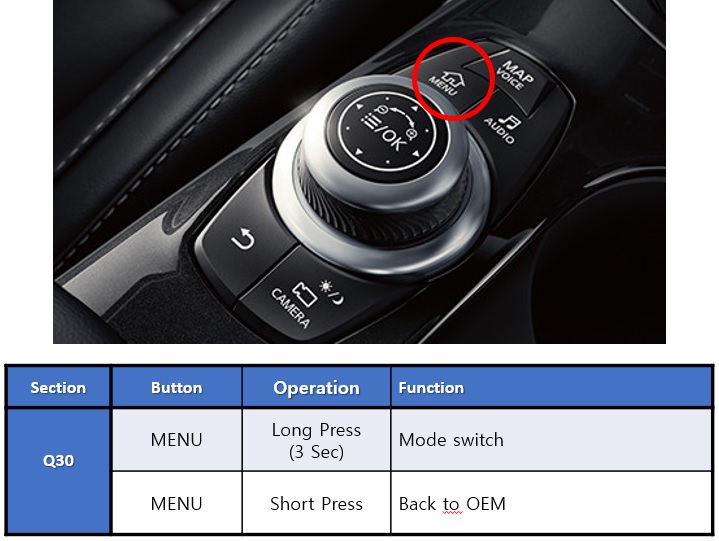
✅Original car button support
✅Audio via Bluetooth streaming*
✅Retain Original Hands-Free Kit & Microphone**
✅Voice control support (Siri & Google Assistant)
✅Rear view camera input
✅Front view camera input
✅MirrorLink support***
✅USB media support***
✅2 Years warranty
❌For Mirrorlink you must have an AUX input in the car
❌The Rear view camera input does not have the parking sensor overlay
NAVconnect OEM Button
NOTES
*When the car does not have audio streaming, AUX input option in the car is recquired
**The must have original Bluetooth carkit and streaming to support the original microphone.
***AUX input is required when you want to use the USB or Mirrorlink feature.
-Check the other tabs for "Compatibility" - "Package contents" - "Product specifications"
DISCLAIMER
Apple, iPod, iPhone, iTunes, CarPlay and the CarPlay logo are registered trademarks of Apple Inc., registered in the U.S. and other countries. Android, Android Auto, Google Maps, Waze
and Talk to Google are registered trademarks of Google Inc.
The Bluetooth® word mark and logos are registered trademarks owned by the Bluetooth SIG, Inc.
Warranty notice: the NAVconnect box has a warranty period of 3 years and the APPplay box 2 years.
The interface inserts ONLY video signals into the infotainment. It is essential to have an Aux-in, when using audio from the CARplay box
VIDEO OUTPUT
Video goes via RGB
CONTROL
You can control APPplay via original touch screen
SCREEN
Interface is compatible with 7.0" monitor
OPEN HU
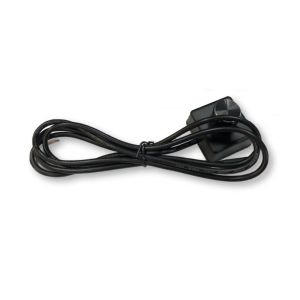
Need to open the monitor to install FFC cable
FRONT CAMERA
The front camera input will automatically switch after leaving the reverse gear.
You can set the display time in seconds via the OSD menu (1-15 sec).
It is also possible to select the FRONT camera input manually
OEM REAR CAMERA
The interface does switch back automatically to the OEM rear camera input when the reverse gear is engaged (only with auto gear box).
GUIDELINES
Static & iPAS lines are available via the interface OSD menu
iPAS
iPAS option is available when the car has original pdc (moveable grid lines)
PIP
PiP option is NOT available for original parking sensor overlay (Picture in Picture)
REAR SELECT CAMERA INPUT
Interface will respond on CAN for cars with auto gearbox. When manual gear box please use the rear detection wire.
INSTALLATION
We recommend that the installation will be performed by a qualified specialist
EXTRA NOTE
MEDIA PLAYER
Media player support the following files:
MUSIC
MP3
VIDEO
MP4
MEDIA PLAYER
Media player support the following files:
MUSIC
MP3
VIDEO
MP4
ANDROID AUTO
Your Phone must be compatible with Android AUTO & Androi Auto app must be available in your county.
An Android phone running Android 5.0 (Lollipop) and up with a data plan. For best performance, we recommend Android 6.0 (Marshmallow) and up. You can check your phone’s software version by looking at the About Device section under Settings
Please check the following link for more info about Android Auto: