
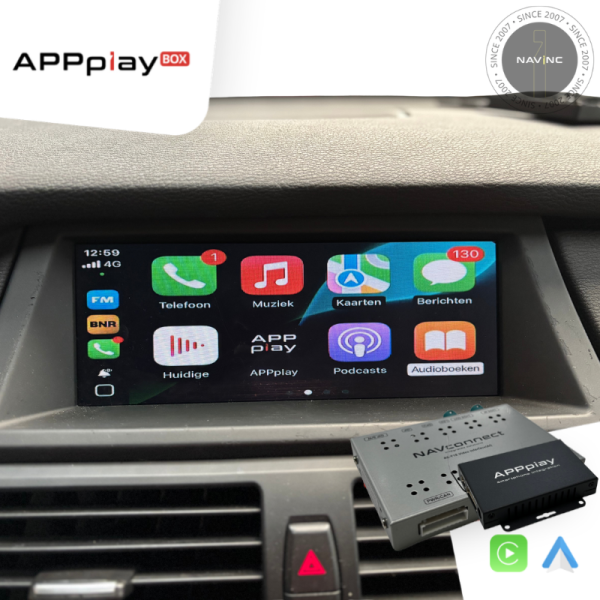
1 serie (E81/E82/E87/E88)
06/2004-08/2009
- Note: Not compatible with force feedback controller - Screen must be opend for installation - PiP option only with 8.8" - CAN rear select only with auto gearbox - use CAN interface when manual gear box
- Head-unit
iDrive CCC Professional & Business - M-ASK (6.5" & 8.8") - APPplay control
Oem iDRIVE - All in one APPplay
- Audio APPplay
Bluetooth / AUX - Rear camera input
- Front camera input
- Activation
Switch & OEM - Open head-unit
- Video signal in
NTSC - Guide lines
Static + Movable (IPAS) - Parking Sensor Display
Split screen - R-gear select
Lamp & CAN
3 serie (E90/E91/E92/E93)
2005-08/2008
- Note: Not compatible with force feedback controller - PiP option only with 8.8" - CAN rear select only with auto gearbox - use CAN interface when manual gear box
- Head-unit
iDrive CCC Professional & Business - M-ASK (6.5" & 8.8") - APPplay control
Oem iDRIVE - All in one APPplay
- Audio APPplay
Bluetooth / AUX - Rear camera input
- Front camera input
- Activation
Switch & OEM - Open head-unit
- Video signal in
NTSC - Guide lines
Static + Movable (IPAS) - Parking Sensor Display
Split screen - R-gear select
Lamp & CAN
5 serie (E60/E61)
2003-2009
- Note: Not compatible with force feedback controller - Compatible with CIC iDrive controlers - PiP option only with 8.8" - CAN rear select only with auto gearbox - use CAN interface when manual gear box
- Head-unit
iDrive CCC Professional & Business - M-ASK (6.5" & 8.8") - APPplay control
Oem iDRIVE - All in one APPplay
- Audio APPplay
Bluetooth / AUX - Rear camera input
- Front camera input
- Activation
Switch & OEM - Open head-unit
- Video signal in
NTSC - Guide lines
Static + Movable (IPAS) - Parking Sensor Display
Split screen - R-gear select
Lamp & CAN
6 serie (E63/E64)
2004-2009
- Note: Not compatible with force feedback controller - PiP option only with 8.8" - CAN rear select only with auto gearbox - use CAN interface when manual gear box
- Head-unit
iDrive CCC Professional & Business - M-ASK (6.5" & 8.8") - APPplay control
Oem iDRIVE - All in one APPplay
- Audio APPplay
Bluetooth / AUX - Rear camera input
- Front camera input
- Activation
Switch & OEM - Open head-unit
- Video signal in
NTSC - Guide lines
Static + Movable (IPAS) - Parking Sensor Display
Split screen - R-gear select
Lamp & CAN
X5 serie (E70)
2007-2009
- Note: Not compatible with force feedback controller - PiP option only with 8.8" - CAN rear select only with auto gearbox - use CAN interface when manual gear box
- Head-unit
iDrive CCC Professional & Business - M-ASK (6.5" & 8.8") - APPplay control
Oem iDRIVE - All in one APPplay
- Audio APPplay
Bluetooth / AUX - Rear camera input
- Front camera input
- Activation
Switch & OEM - Open head-unit
- Video signal in
NTSC - Guide lines
Static + Movable (IPAS) - Parking Sensor Display
Split screen - R-gear select
Lamp & CAN
X6 serie (E71)
2008-2009
- Note: Not compatible with force feedback controller - PiP option only with 8.8" - CAN rear select only with auto gearbox - use CAN interface when manual gear box
- Head-unit
iDrive CCC Professional & Business - M-ASK (6.5" & 8.8") - APPplay control
Oem iDRIVE - All in one APPplay
- Audio APPplay
Bluetooth / AUX - Rear camera input
- Front camera input
- Activation
Switch & OEM - Open head-unit
- Video signal in
NTSC - Guide lines
Static + Movable (IPAS) - Parking Sensor Display
Split screen - R-gear select
Lamp & CAN
Requirement
|
The interface inserts ONLY video signals into the infotainment. It is essential to have an Aux-in, when using audio from the APPplay box |
|
|
VIDEO OUTPUT |
Video goes via LVDS |
|
CONTROL |
You can control APPplay via the original iDrive controller |
|
SCREEN |
Interface is compatible with iDrive Business (6.5") & Professional (8.8”) |
|
OPEN HU |
Not need to open the monitor |
|
FRONT CAMERA |
The front camera input will automatically switch after leaving the reverse gear. You can set the display time in seconds via the OSD menu (1-15 sec). It is also possible to select the FRONT camera input manually |
|
OEM REAR CAMERA |
The interface does not switch back automatically to the OEM rear camera input when the reverse gear is engaged (with auto gear box). |
|
GUIDELINES |
Static lines are available via the interface OSD menu |
|
iPAS |
iPAS option is NOT available |
|
PIP |
PiP option is available for original parking sensor overlay (Picture in Picture) |
|
REAR SELECT CAMERA INPUT |
Interface will respond on CAN for cars with auto gearbox. When manual gear box please use the rear detection wire. |
|
INSTALLATION |
We recommend that the installation will be performed by a qualified specialist |
|
EXTRA NOTE |
PiP function = split screen iDrive CCC controllers with resistance on the end of the iDrive menu (force feedback") --> APPplay control via iDrive not possible. You must use an external controller.
|
Start a Conversation
Hi! Click one of our support members below to chat on WhatsApp
- The team typically replies in a few minutes. (Opening hours Ma-Fri: 09:00-17:00 (lunch 12:30-13:00)